Mobile Attendance App: Geofencing, Proxies and Field Staff
By OnGrid · 26 October 2026 · 8 min read
In short
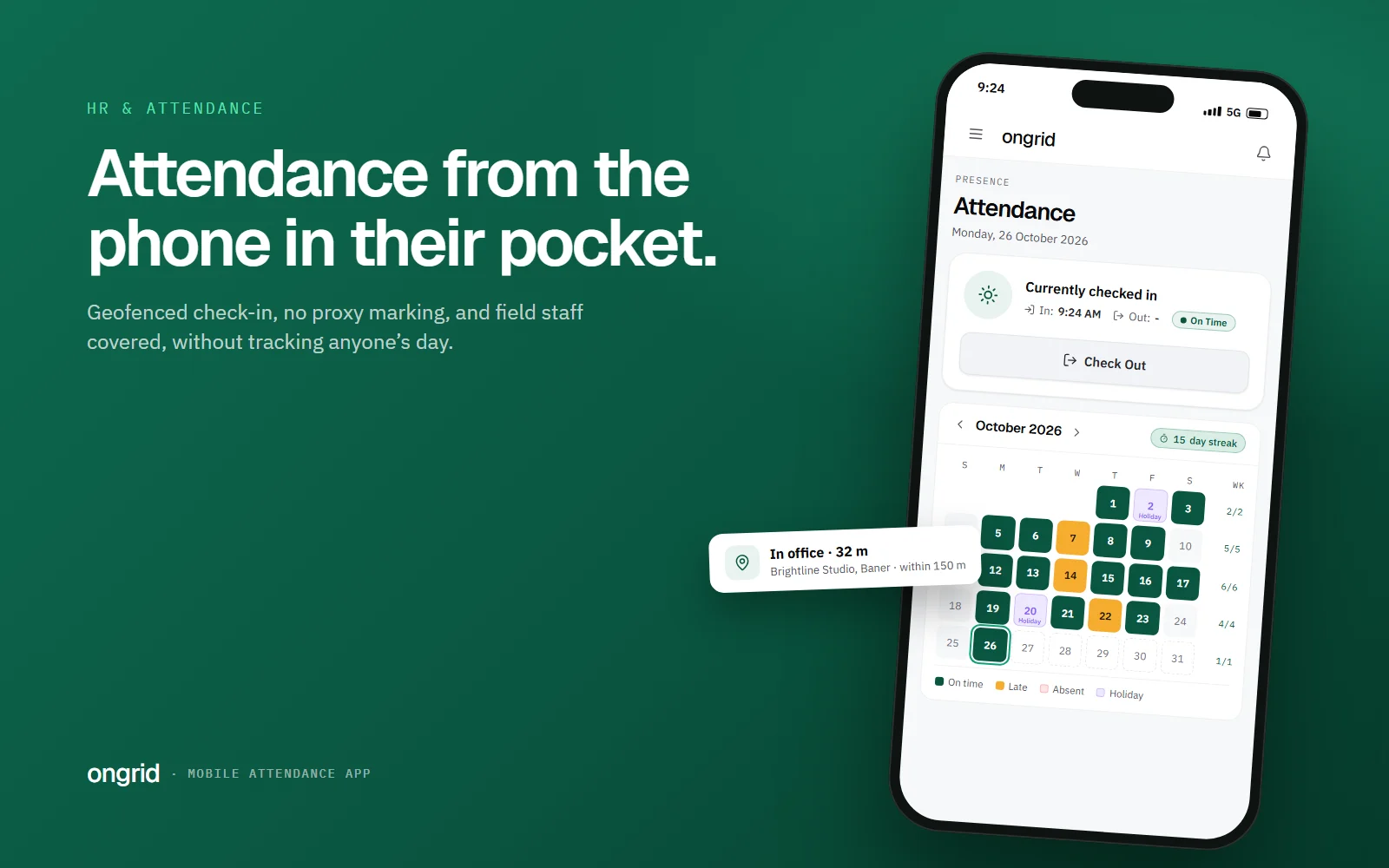
- A mobile attendance app lets people check in from their phone, with an office geofence recording whether they were inside the office radius at that moment. Start in flag mode to learn your exceptions, exempt field staff, read location only at check-in, and switch to enforce only once you know who genuinely works elsewhere.
Most small teams in India still mark attendance the old way. There is a register near the door, a WhatsApp message saying "reached", or a fingerprint machine that works on good days. A mobile attendance app replaces all three with one button on the phone people already carry. Done well, it also answers the question every owner eventually asks: was this person actually at the office when they checked in?
This guide covers how phone check-in works, where office geofencing helps and where it does not, how to handle field staff, and what to ask before you pick an app. If you are still setting up the basics, start with our guide to attendance management for small businesses and come back here.
Why are small teams moving off registers and biometric machines?
Registers fail quietly. Someone writes 9:30 when they walked in at 10:15, or a colleague signs for them. Nobody adds up the register until salary day, and by then the month is gone.
Biometric machines fix the signing-for-a-friend problem but bring their own. The device sits at one entrance, so it is useless for anyone starting the day at a client site, and the data usually lives in a separate tool that never meets your leave records.
Phone check-in has a simpler appeal. Everyone already has the device, it works wherever the person starts work, and the record lands in the same system as leave, holidays and shifts. The trade-off is trust: a phone can be anywhere, so you need a way to tell "checked in from the office" apart from "checked in from bed".
How does a mobile attendance app check that someone is at the office?
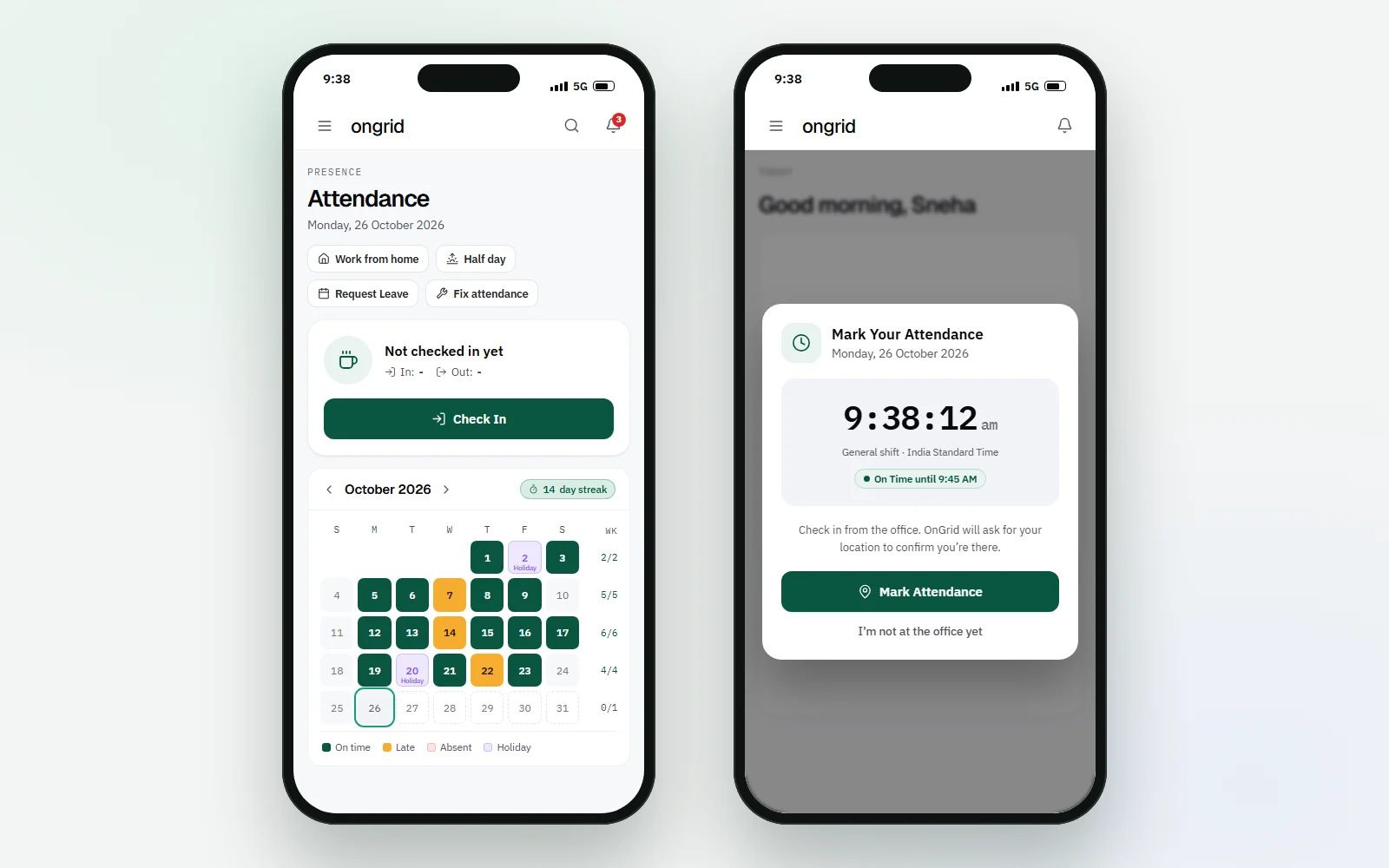
Through a geofence: a circle drawn around your office on a map. When someone taps Check In, the app asks the phone for its location once, measures the distance to the office, and records whether the person was inside or outside the circle.
The radius. Phone GPS is good, not perfect. Android's own documentation says precise location is usually accurate to within about 50 metres, sometimes a few metres, while approximate location can be off by around 3 square kilometres (Android developer docs). A 20-metre circle will reject people standing at your reception. In OnGrid the default office radius is 150 metres and you can set anything from 50 metres to 2 km, which covers a single floor in a dense market area as well as a large factory campus.
Where the decision is made. If the phone decides "you are inside" and simply tells the server, anyone who can edit a request can fake it. The safer design sends the raw position and lets the server measure the distance. That is how OnGrid does it: the database computes the distance to the nearest office and sets the result, so the app cannot mark itself as inside.
Should you flag or block check-ins from outside the office?
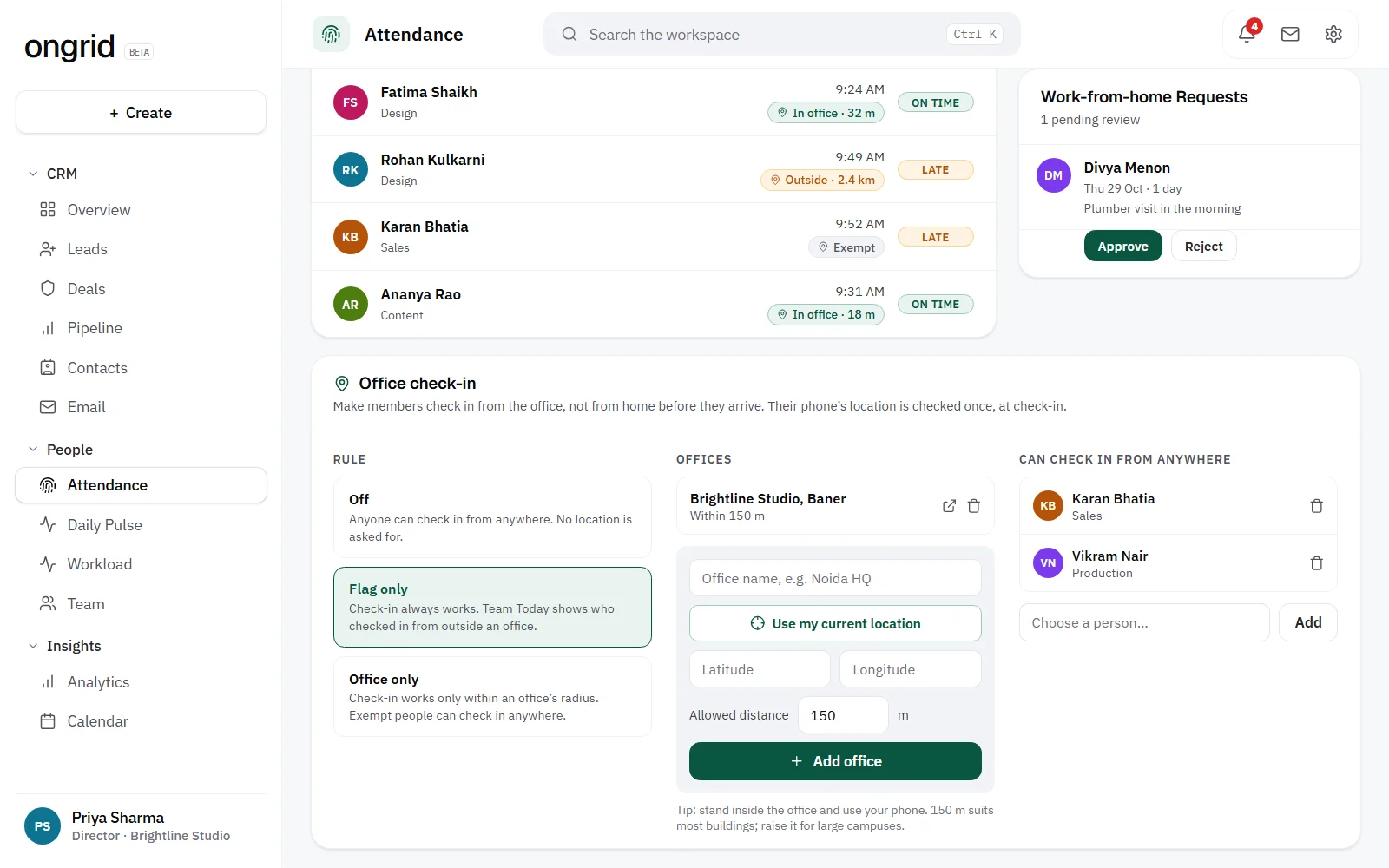
This is the most important setting, and most teams pick the strict option too early. There are three sensible modes:
Off. No location is asked for or stored. Good for fully remote teams, or for the first two weeks while people get used to checking in at all.
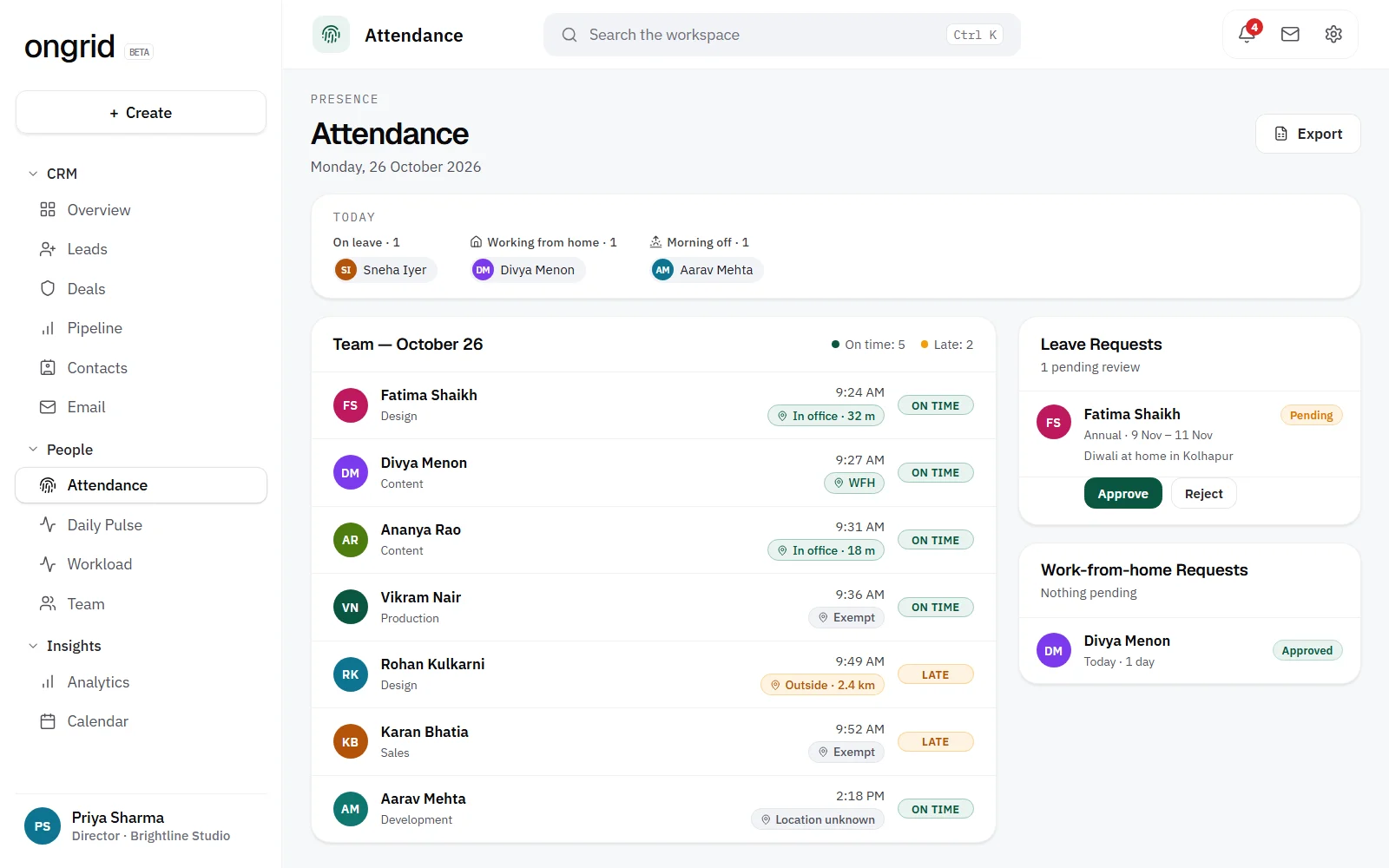
Flag. Check-in always works, and the result (inside, outside or unknown) is recorded so a manager can see who checked in from elsewhere. Nobody is blocked.
Enforce. Check-in is refused unless the phone is inside an office radius. The person sees how far away they are and can try again once they arrive.
We recommend starting on flag for a month. You will learn which people genuinely start the day elsewhere, which phones report poor location, and whether you have a real problem at all. Often the "check in from home, arrive at 11" habit is two people, not twenty, and a quiet conversation fixes it faster than a hard block.
Move to enforce only when you know your exceptions. Otherwise your first morning on enforce becomes a queue of people standing outside the gate, refreshing the app.
[TEAM NOTE: Add what happened when our own team (or a customer) switched from flag to enforce: how many people were checking in from outside in the first month, and what changed after. A real before/after number here is worth more than any paragraph.]
Does geofencing stop proxy attendance completely?
No, and any vendor who says it does is overselling. A determined person can install a fake-location app on Android and report a position they are not at. Geofencing raises the effort from "ask a friend to sign the register" to "install and configure a spoofing tool", which is enough for almost every team. It is a deterrent, not proof of presence.
Three things close most of the remaining gap:
Lock the record after check-in. If someone can edit their own check-in later, the geofence is decoration. In OnGrid the check-in time comes from the server clock, not the phone, and the stored location cannot be rewritten.
Reject vague locations. A laptop on office Wi-Fi often reports its position to within several hundred metres. OnGrid treats anything less precise than about 300 metres as "unknown", and in enforce mode asks the person to turn on precise location or use their phone.
Make corrections a request, not an edit. People do forget to check in. Give them a "fix attendance" request that a manager approves, so every change has a reason and a name on it.
How should you handle field staff and people who work elsewhere?
Sales reps, site engineers, delivery staff and anyone on a client visit will fail a geofence on most days. Do not widen the radius to 5 km. Exempt them.
An exempt person checks in without a location check, so their record is not marked "outside" every morning. Review the list every quarter, because roles change.
For hybrid staff, the cleaner fix is a work-from-home request. They ask for Tuesday at home, a manager approves it, and the attendance for that day reads correctly without anyone needing to explain later. If you have not written down your rules for this yet, our work from home policy template has a format you can copy. People on approved leave should not need to check in at all; the leave policy template covers how to set those rules.
If your team works in shifts, the check-in window needs to follow the shift rather than one office time. A 6 AM warehouse shift and a 10 AM office shift should not share a "late after 10:15" rule. We cover that in shift scheduling for small teams.
What does it actually cost you to skip this? A worked example
Take a 20-person office where the average salary is ₹30,000 a month, with 26 working days and a 9-hour day.
Cost of one working day per person: ₹30,000 ÷ 26 ≈ ₹1,154
Cost of one working hour: ₹1,154 ÷ 9 ≈ ₹128
Suppose 3 people arrive an hour after the time they record, on 12 days a month
Hours paid but not worked: 3 × 1 × 12 = 36 hours
Monthly cost: 36 × ₹128 ≈ ₹4,600, or about ₹55,000 a year
Swap in your own numbers. The point is not that everyone cheats; small, invisible gaps add up, and a register gives you no way to see them.
[TEAM NOTE: Replace or back up this example with a real figure from our own attendance data or a customer story, e.g. how many late or outside check-ins showed up in the first month after switching to phone check-in.]
What about privacy and employee consent?
This is where a lot of teams lose goodwill. People are fine with "the app checks I am at the office when I check in". They are not fine with "the company watches where I am all day".
So set two rules and say them out loud:
Location is read once, at the moment of check-in, not tracked through the day.
If location checks are off for someone (because the mode is off or they are exempt), no location is stored for them at all.
That is how OnGrid works by design, and it is the standard you should hold any app to. India's Digital Personal Data Protection Act, 2023 also expects you to tell people what you collect and why, keep data secure, and delete it once the purpose is met. Employment is one of the listed legitimate uses, but that is not a licence to collect more than you need. PRS Legislative Research has a clear summary of the Act's key provisions. Put your location rule in writing before you switch it on; for structure, see how to write an SOP your team will actually follow.
How do you choose a mobile attendance app? A checklist
Use this list when you trial any tool, including ours:
Does it work on the phones your team has? A web app that installs to the home screen covers Android and iPhone without a store download. Check it on your cheapest handset, not the owner's phone.
Is the location check done on the server? Ask the vendor directly. If they cannot answer, assume it is not.
Can you flag before you enforce? You want a soft mode to learn your exceptions.
Can you exempt individuals? Field staff need it on day one.
Are check-in times locked to the server clock? Changing the phone's clock should not change the record.
What happens when someone forgets to check out? Look for a reminder, and an automatic close-out that is clearly marked as automatic so it does not pollute your hours data.
Is there a correction request with approval? Edits should leave a trail.
Does it know your holidays, weekly offs, shifts and leave? Otherwise every 2nd Saturday shows as an absence.
Is the pricing per employee? Per-head pricing punishes you for growing. Do the maths for your headcount a year from now.
How do you roll it out without a revolt?
Keep the first month boring. Announce the change a week ahead with the privacy rule in one sentence. Start with location off so people build the habit, turn on flag in week two, and review outside entries with each person privately, never in a group chat. Thank the early adopters publicly; a few of our employee recognition ideas cost nothing. Only then decide whether enforce is worth it.
OnGrid includes phone check-in, office geofencing with off, flag and enforce modes, exemptions, correction requests and missed check-out handling, alongside leave, holidays and shifts. If you want to see it with your own team, you can look at how attendance and leave work in OnGrid and set up a workspace in a few minutes.
Frequently asked questions
Can employees fake their location in a mobile attendance app?
A determined person can use a fake-location app on Android, so geofencing is a deterrent rather than proof of presence. It stops the common habit of checking in from home and arriving later. Locking check-in times to the server clock and rejecting imprecise locations closes most of the remaining gap.
What radius should I set for an office geofence?
Start around 150 metres. Phone GPS is usually accurate to within about 50 metres, so a very small circle will reject people who are genuinely at the office. Go larger for big campuses or offices in tall buildings where the signal is weaker.
Does a mobile attendance app track employees all day?
It should not. A well-designed app reads the location once, at the moment someone checks in, and stores nothing when location checks are switched off for that person. Make this rule part of your written attendance policy so your team knows exactly what is collected.
How do I handle field staff with a geofenced attendance app?
Exempt them from the location check rather than widening the radius for everyone. They still check in, but their record is not marked as outside the office every day. Review the exemption list every few months as roles change.
Is a phone attendance app better than a biometric machine?
For most small teams, yes. It works wherever people start work, needs no hardware at the door, and keeps attendance in the same place as leave and shifts. Biometric devices still make sense where many workers share one entrance and few have smartphones.